
Order flow
Funding rate explained: who pays, when, and how to compare
What a perpetual funding rate is, who pays whom, why 1-, 4- and 8-hour schedules must be converted before comparing, and how to track it in AlertaChart.
Every perpetual futures market has a small number that quietly moves money between traders: the funding rate. It shows which side pays to keep its positions open, and it is one of the quickest ways to see where leverage leans. This guide explains what the rate is, why raw rates from different exchanges cannot be compared, and how to follow funding across five exchanges in AlertaChart. Live numbers are on the crypto funding rates page; every order-flow tool is described in the Help Center article on order flow.
What a funding rate is
A perpetual contract tracks a coin's price but never expires, so no delivery date pulls its price back to the spot market. Exchanges use periodic payments between the two sides instead. When the rate is positive, longs pay shorts; when it is negative, shorts pay longs. Binance and OKX document this direction rule, and Hyperliquid states that funding passes between traders with no fee kept by the exchange.
Two details decide whether you are affected. Only positions open at the settlement moment pay or receive, so a position closed a minute earlier owes nothing for that period. And the amount is the position's value times the rate, not your margin times the rate, so leverage magnifies the cost relative to the money you put up.
Where the number comes from
On Binance and Bybit the published formula combines an average premium index, which measures how far the perpetual trades from its index price, with a fixed interest component of 0.01% per 8 hours (Bybit writes 0.03% a day). The difference between the two is clamped to ±0.05%. As a result, while the average premium stays within 0.05 percentage points of the interest component, the rate equals the interest component. That is why 0.0100% per 8 hours shows up so often in quiet markets, and why a move away from it signals a real premium or discount.
How to read the number
- Sign: positive means longs pay, negative means shorts pay.
- Period: a rate belongs to a payment interval. 0.0100% per 8 hours and 0.0100% per hour are very different costs.
- Scale: small rates add up. A constant 0.0100% per 8 hours is 10.95% a year without compounding; AlertaChart's APR option is the 8-hour rate × 1,095.
- Timing: until settlement, the rate shown is a running estimate for the current period. Bybit, for example, recalculates it every minute.
Why raw rates from different exchanges do not compare
Exchanges settle on different clocks, and the clock can differ between contracts on the same exchange:
| Exchange | Payment schedule (from its own documentation) |
|---|---|
| Binance | Every 8 hours at 00:00, 08:00 and 16:00 UTC by default; many contracts every 4 hours; can be shortened to as little as 1 hour in extreme volatility |
| Bybit | Each contract has its own interval, published in minutes in its API; Bybit may adjust it |
| OKX | Every 8 hours at 00:00, 08:00 and 16:00 UTC by default; some contracts every 1, 2 or 4 hours |
| Hyperliquid | Every hour: one eighth of an 8-hour rate |
| Coinbase (US perpetual-style futures) | Accrues hourly (its API reports a 3,600-second interval), settled twice a day |
The default is not the norm. Counting the active USDT perpetuals on 5 October 2026 from the exchanges' own APIs, 420 of Binance's 526 single-coin contracts (its two index contracts left out) settled every 4 hours, 105 every 8 hours and 1 hourly; on Bybit, 401 of 782 settled every 8 hours, 379 every 4 hours and 2 hourly.
Example numbers: a 4-hour contract quoting +0.0050% per payment and an hourly contract quoting +0.0020%. The hourly figure looks smaller, yet over a day it costs 0.0020% × 24 = 0.0480%, against 0.0050% × 6 = 0.0300%. On an 8-hour basis they are 0.0160% and 0.0100%. Binance's published formula, and OKX's since June 2026, also divide the rate of an N-hour contract by 8/N, so shorter intervals print smaller numbers by design: compare 8-hour equivalents, not raw prints.
How AlertaChart puts five exchanges on one scale
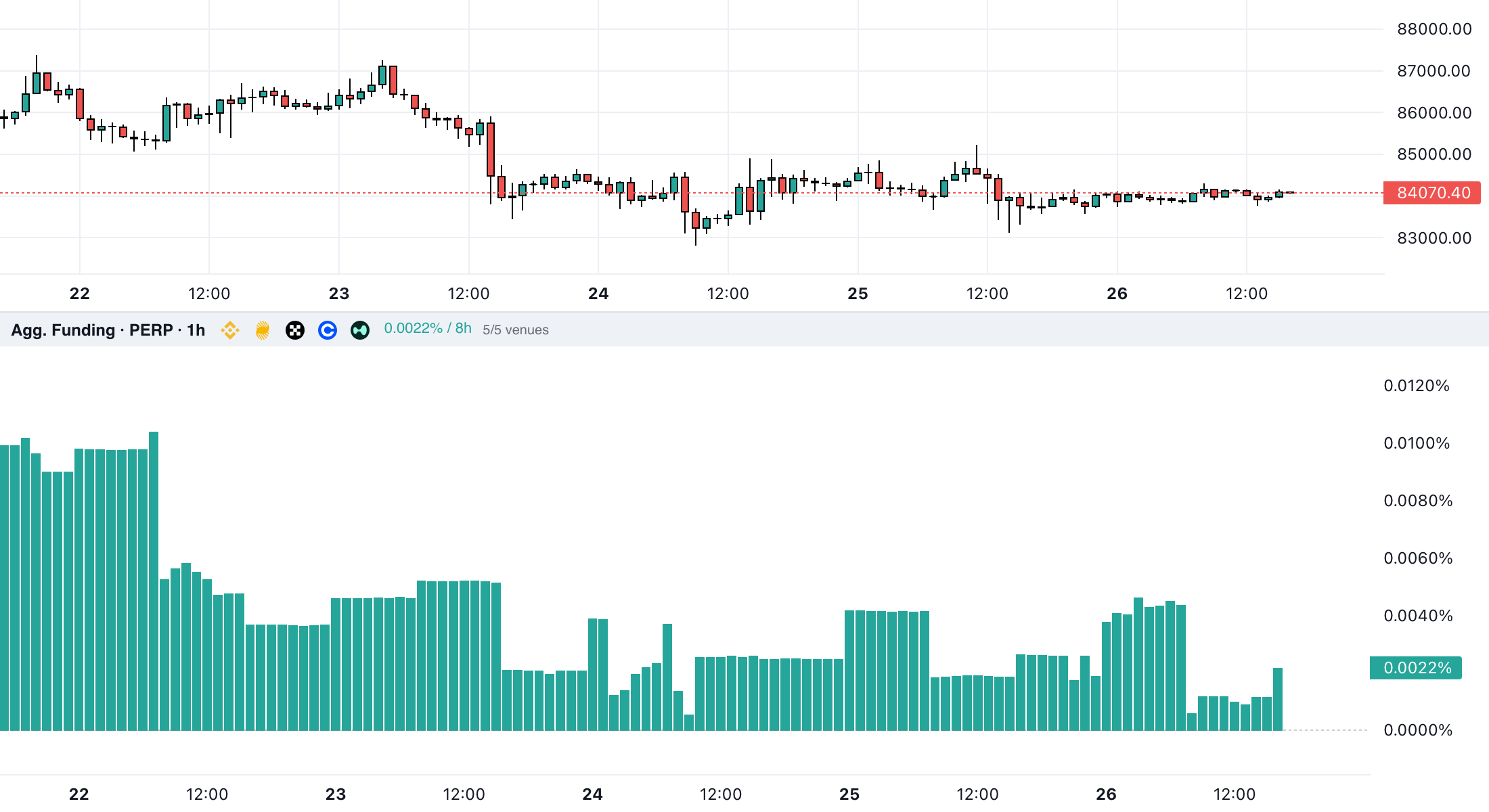
The Agg. Funding panel combines Binance, Bybit, OKX, Coinbase and Hyperliquid for one coin in three steps:
- Same period. Each rate is converted to 8 hours: rate × 8 ÷ the contract's interval in hours. The interval is read from that contract's own payment history, so one missed payment does not turn a 4-hour contract into an 8-hour one.
- Weighted average. The converted rates are averaged with each exchange's open interest in the coin as the weight. Contracts quoted in thousands, such as 1000PEPE, count as the coin itself.
- Fallback. An exchange without an open-interest figure at that bar is left out of the weights; if none has one, the bar is a simple average.
Example numbers: exchange A at +0.0100% per 8 hours with 60,000 BTC of open interest, exchange B at −0.0200% with 20,000 BTC. Weighted: (0.0100 × 60,000 − 0.0200 × 20,000) ÷ 80,000 = +0.0025%. A simple average says −0.0050%, the opposite sign, because it gives the smaller venue an equal voice.
For exchanges that settle every 4 or 8 hours, the running period has no settled rate yet; the panel uses the exchange's current estimate until the settlement replaces it, so the latest bars are not made of hourly venues alone.
Using funding in AlertaChart, step by step
- Open a crypto chart, spot or perpetual (perpetuals end in .P, see spot and perpetual markets). On a spot chart the aggregated panels read funding from the coin's perpetual markets.
- Click Orderflow in the chart toolbar to open the Orderflow Toolbox.
- Under Aggregated (all venues), add Agg. Funding. Its header shows the current value and the exchanges counted, for example 5/5 venues.
- For the chart's own exchange only, add Funding Rate. It works on perpetual charts and shows the rate as that exchange quotes it, per payment, without conversion.
- Open the gear on the panel for the settings below.
Open the BTC/USDT perpetual chart, then add Agg. Funding from Orderflow →Pro
The order-flow tools are part of the Pro and Elite plans (compare plans). Scripts can read the same data: .P_FUNDING tickers return a decimal rate per 8 hours (see order flow data).
Compare coins and work out a payment
The funding rates page lists each exchange's rate for the major coins on an 8-hour basis, the weighted average and the most positive and negative coins in the latest snapshot. Its funding fee calculator starts from a coin's current rate, or yours, and shows what a long or short of a given USD value pays or receives per payment, per day and per year, at 1-, 4- or 8-hour intervals.
Get an alert when funding crosses a level
With Pro, open Settings, then Alerta Pro Alerts, choose the Funding tab and Create Funding Alert. Pick a futures symbol, a Funding Threshold of 0.01%, 0.03%, 0.05% or 0.10% and a Monitoring Direction (Both, Positive or Negative). Plan limits are in the Help Center article on alerts.
Settings that matter
- Rate per: 1 hour, 8 hours (the default), 1 day or Year (APR). It rescales the same series.
- Average: Weighted by open interest (the default) or Simple. Simple is useful to see how far a small exchange strays.
- Venues: switch exchanges off from their logos or in the gear. Grey is off, faded means no data for this coin, "!" means the data could not be loaded.
- Plot: Bars (the default) or Line.
Reading extremes without over-reading them
A rate far above the usual 0.0100% per 8 hours means longs pay heavily to stay in: the long side is crowded, as the Help Center puts it. A deeply negative rate says the same about shorts. Neither says when the crowding unwinds; it can last for days, and an exchange's rate cap can hide how one-sided the market really is.
Funding says more next to open interest: rising funding with rising open interest means new leveraged positions on the paying side. The open interest guide covers those combinations, and the liquidation heatmap guide shows where crowded positions might be forced out.
Common mistakes
- Comparing raw rates from exchanges with different payment intervals.
- Treating the current rate as settled; until the payment it can change.
- Calculating the cost on margin instead of position value.
- Reading APR as a return you can lock in. It assumes a constant rate for a year.
- Treating high funding as a sell signal on its own.
Method and limitations
The explanations follow each exchange's own documentation; the AlertaChart steps follow the Help Center and the product code as of 5 October 2026. Keep these limits in mind:
- Five exchanges only. Positions on other exchanges are not counted.
- Your payment depends on your exchange. The average describes the market; a position pays or receives its own exchange's rate.
- Schedules change. Exchanges can change a contract's interval and rate limits at short notice; the counts above are a snapshot.
- Partial bars. A bar missing an exchange that should be there is drawn faded. Missing data never counts as zero.
- Not a forecast. Funding describes positioning and its cost; it does not predict price.
Related guides
Sources
- Order flow: CVD, open interest, funding and liquidations — AlertaChart Help Center (accessed Oct 5, 2026)
- Crypto funding rates across five exchanges — AlertaChart (accessed Oct 5, 2026)
- Introduction to Binance Futures Funding Rates (updated 2026-03-06) — Binance (accessed Oct 5, 2026)
- USDⓈ-M Futures API: Get Funding Info (fundingIntervalHours of adjusted contracts) — Binance (accessed Oct 5, 2026)
- Introduction to Funding Rate (last updated 2026-05-22) — Bybit (accessed Oct 5, 2026)
- V5 API: Get Instruments Info (fundingInterval, in minutes) — Bybit (accessed Oct 5, 2026)
- Perpetual funding fee mechanism (updated 2026-08-27) — OKX (accessed Oct 5, 2026)
- Revision of the funding rate formula for OKX perpetual futures (8/N interval factor), 29 May 2026 — OKX (accessed Oct 5, 2026)
- Funding — Hyperliquid Docs (accessed Oct 5, 2026)
- US Perpetual-Style Futures Funding Rate Mechanism — Coinbase (accessed Oct 5, 2026)
- Advanced Trade API: Get Public Product (funding_rate, funding_interval) — Coinbase (accessed Oct 5, 2026)
This guide is for education only and is not investment advice.
How this guide was made Drafted with AI from AlertaChart's Help Center and source code; product facts checked against the code and the Help Center; external facts from the cited primary sources.
Changes · Version 1.0
- · 1.0 — First version.